UnitDriven for Windows Phone 7

I have extended UnitDriven to provide support for (the current beta release of) Windows Phone 7. This means you can write a unit test that runs on .NET, Silverlight and Windows Phone. This is an Alpha release for now, hopefully if we get a few people to use it I can make a more stable release when the final version of the  WindowsPhone7 SDK is released.

Download: http://unitdriven.codeplex.com/releases/view/50214

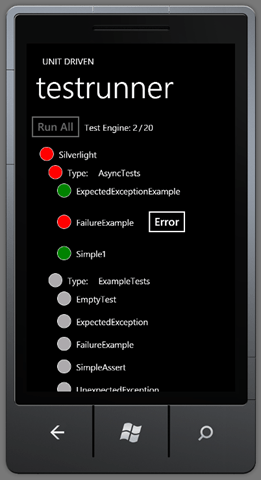
Here is a screenshot of UnitDriven running tests on the WindowsPhone7 emulator.

UnitDrivenPhone

One interesting thing is that all I had to do to support this was link files from the Silverlight version of UnitDriven into a new Phone project. It all compiled and ran on the first try.

However, even though it ran it wasn’t actually usable. I had to create new versions of the Views to accomodate the smaller screen size and default layout differences (buttons are relatively bigger for example). Also the scroll bars are only visible while scrolling and you have to click and drag on a Circle or the text to actually do the scrolling.

Please feel free to comment on the UnitDriven forums if you have any comments or questions!

Identifiers in C# or Morse Code API

We all new that the underscore (‘_’) was a valid character in C# identifiers but what I didn’t know is that it is legitimate to have nothing but underscore characters. I found this out while doing some code generation and identifier scrubbing. By that I mean if you are trying to create class names or namespaces based on user input you have to scrub out invalid characters and I chose to replace them with underscores.

I decided to mess around with this and I came up with a quick Morse Code API based on my misuse of underscore identifiers.

// SOSConsole.WriteLine("Transmitting: SOS");
Morse.Code._._._.o.___.___.___.o._._._.Play();
Symbol Name
._ dit
.___ dah
.o. Letter
.ooooo. Word

So, SOS above is “dit dit dit, dah dah dah, dit dit dit”. It plays by using Console.Beep and letter and word boundaries use Thread.Sleep. Here’s a more complicated example taken from wikipedia!

Console.WriteLine("Transmitting: Morse Code");
Morse.Code.
//         1         2         3         4         5         6         7         8
//12345678901234567890123456789012345678901234567890123456789012345678901234567890123456789

//M------   O----------   R------   S----   E       C----------   O----------   D------   E
//===.===...===.===.===...=.===.=...=.=.=...=.......===.=.===.=...===.===.===...===.=.=...=  
  ___.___.o.___.___.___.o._.___._.o._._._.o._.ooooo.___._.___._.o.___.___.___.o.___._._.o._
//        ^               ^    ^       ^             ^
//        |              dah  dit      |             |
//   symbol space                letter space    word space.Play();

It actually sounds pretty good!

Download:

Non-generic Enum.TryParse

It turns out that there isn’t a non-generic TryParse overload in .net 4. This seems like a pretty egregious oversight so I created my own.

public static class EnumHelper
{
    static MethodInfo enumTryParse;

    static EnumHelper()
    {
        enumTryParse = typeof(Enum).GetMethods(BindingFlags.Public | BindingFlags.Static)
            .Where(m => m.Name == "TryParse" && m.GetParameters().Length == 3)
            .First();
    }

    public static bool TryParse(
        Type enumType, 
        string value, 
        bool ignoreCase, 
        out object enumValue)
    {
        MethodInfo genericEnumTryParse = enumTryParse.MakeGenericMethod(enumType);

        object[] args = new object[] { value, ignoreCase, Enum.ToObject(enumType, 0) };
        bool success = (bool)genericEnumTryParse.Invoke(null, args);
        enumValue = args[2];

        return success;
    }
}

enjoy.

UnitDriven v0.0.5 Available

http://unitdriven.codeplex.com/releases/view/46068

I applied some updates to UnitDriven and released a new version recently. The updates provide some nicer nesting of namespaces in the test runner UI as well as improved disabling of ‘Run’ buttons and correctly functioning Timeouts.

Also the update is paired with updates to StatLight so you can run your Silverlight unit tests in a purely automated fashion.

Also, if you find yourself trying to remember why you would want to use UnitDriven instead of one of the other unit test frameworks for Silverlight, here are the main features.

  • First class support for asynchronous tests.
  • Supports the ability to author identical tests for Silverlight and .NET (file linking).
  • Parallels either MSTest or NUnit seamlessly.

T4 Text Transformation in MetaSharp

Previously in MetaSharp I had a custom Templating engine for textual transformations. It was a custom grammar and was pretty simple. It worked well and all was good but it was becoming a maintenance burden for me and, I think, turned people off to MetaSharp more than attracted them. So I decided to spend a little time and try to integrate T4 into my templating library as a replacement.

It was actually reasonably simple to accomplish. The hardest part, of course, was working with AppDomains. T4 is a dynamic tool living in a static world and as such it requires an AppDomain to do its magic so it can all be unloaded without a trace. Because of this T4 isn’t very amenable to input. Most examples I found online start with firing up your template then beginning by reading a file or creating a class that connects to a database. In my case I have already have my metadata and would like to pass it into a T4 template but it’s in memory only. The first thing you have to do is make your model Serializable.

Next you need to know about the “inherits” and the “hostspecific” attributes. You add something like this to the top of your template:

<#@ template language="C#" inherits="SongMetaTemplate" hostspecific="true" debug="true" #>

This is for my Song sample application. I then create a SongMetaTemplate class that knows how to cast the model into a Song enumeration.

public abstract class SongMetaTemplate : MetaTemplate
{
    public IEnumerable<Song> Songs
    {
        get { return ((IEnumerable<INode>)this.Model).Cast<Song>(); }
    }
}

Adding a hostspecific attribute to the template causes the template class that inherits from the SongMetaTemplate to also have a Host property which gets loaded up with the Model provided by my pipeline. The MetaTemplate knows how to fetch that host model for me.

public abstract class MetaTemplate : TextTransformation
{
    private object model = null;

    protected object Model
    {
        get
        {
            if (model == null)
            {
                dynamic metame = this;
                var metaHost = metame.Host as MetaSharpTextTemplatingHost;
                if (metaHost != null)
                    this.model = metaHost.Model;
            }

            return model;
        }
    }

    public override string TransformText()
    {
        return this.GenerationEnvironment.ToString();
    }
}

And that’s it! My template can now get a hold of the Song AST parsed from the DSL earlier in the pipeline. Here is an example template in its entirety:

<#@ template language="C#" inherits="SongMetaTemplate" hostspecific="true" debug="true" #>
<#@ assembly name="DynamicSongBuilder" #>
<#@ import namespace="DynamicSongBuilder" #>

<# foreach(var song in this.Songs) { #>
    <# foreach(var b in song.Bars) { #>
        <# foreach(var n in b.Notes) { #>
            play(<#=song.Duration #>, "<#=n.Key #>", <#=n.Octave #>);
        <# }
    }
} #>

The template code is C# but the code generated is actually for my own custom language. In this case it’s parsed into Linq expressions and compiled into a delegate using a context object with a play method. It’s then executed dynamically and also collected by the GC when dereferenced. I plan to replace the custom language also, but its proving difficult without a reasonable parser to replace it.