Creating Shapes with PathBuilder

In a previous post I showed a quick demo of a PathBuilder class I created to help draw dynamic shapes. I would like to include a simple example of how to create Shape controls using the same tool.

I have created a very simple Triangle control which you can download and see run.

Download Triangle Demo

Here is the actual Triangle class

class Triangle : Shape
{
    private Geometry geometry;

    public static readonly DependencyProperty P1Property = DependencyProperty.Register(
        "P1",
        typeof(Point),
        typeof(Triangle),
        new UIPropertyMetadata(OnPointChanged));

    public static readonly DependencyProperty P2Property = DependencyProperty.Register(
        "P2",
        typeof(Point),
        typeof(Triangle),
        new UIPropertyMetadata(OnPointChanged));

    public static readonly DependencyProperty P3Property = DependencyProperty.Register(
        "P3",
        typeof(Point),
        typeof(Triangle),
        new UIPropertyMetadata(OnPointChanged));

    public Point P1
    {
        get { return (Point)GetValue(P1Property); }
        set { SetValue(P1Property, value); }
    }

    public Point P2
    {
        get { return (Point)GetValue(P2Property); }
        set { SetValue(P2Property, value); }
    }

    public Point P3
    {
        get { return (Point)GetValue(P3Property); }
        set { SetValue(P3Property, value); }
    }

    private static void OnPointChanged(DependencyObject sender, DependencyPropertyChangedEventArgs e)
    {
        ((Triangle)sender).UpdateGeometry();
    }

    private void UpdateGeometry()
    {
        this.geometry = PathBuilder.Start()
            .Move(P1)
            .DrawLine(P2)
            .DrawLine(P3)
            .DrawLine(P1)
            .Close()
            .ToGeometry();
    }

    public Triangle()
    {
        this.UpdateGeometry();
    }
        

    protected override Geometry DefiningGeometry
    {
        get 
        {
            return this.geometry;
        }
    }
}

Notice I inherited from Shape and use the PathBuilder to generate a Geometry object and return it in the protected DefiningGeometry property.

I had to add one method to my PathBuilder:

public static Geometry ToGeometry(this IPath path)
{
    var converter = new GeometryConverter();
    return (Geometry)converter.ConvertFromString(path.Data);
}

This method converts the path string into a Geometry object. Here is the xaml to display this control:

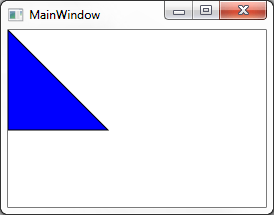
<c:Triangle P1="0,0" P2="0,100" P3="100,100" StrokeThickness="1" Stroke="Black" Fill="Blue" />

And finally the Triangle in action

image

WPF or Silverlight PathBuilder

Every once in a while you find yourself needing to draw some type of a shape dynamically. One easy example is arrows connecting visuals that are movable. In some cases you can simply place arrows where you expect the visuals to be but in others the visuals can move around in non-fixed ways. For those scenarios you need to create lines dynamically.

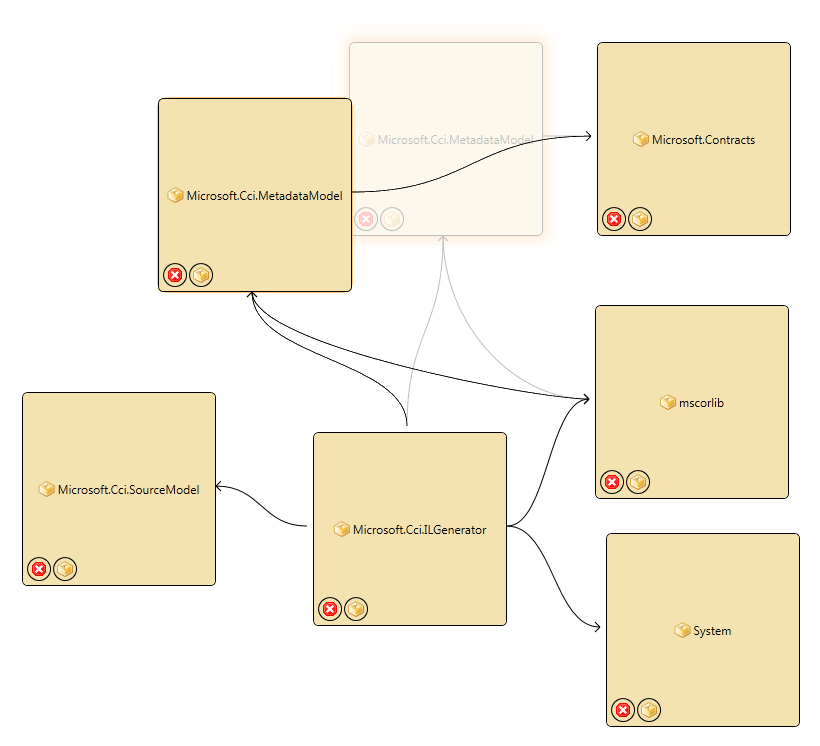
path_builder_example

In the composite screenshots above I am showing a scenario where I am able to drag the nodes around free form and I need the arrows to continuously update as the visual is moving to show relationships. You can imagine various other scenarios where you would need data driven shapes.

I have created a simple API for creating Path data in WPF or Silverlight. It is based on the idea that you can bind a string to the Data property of a Path object and all you need to do is to produce valid Path Data syntax in a string and you get a dynamic shape.

public enum SweepDirection
{
    Clockwise,
    CounterClockwise
}

public interface IPath
{
    string Data { get;}
}

public static class PathBuilder 
{
    private enum DrawCommand
    {
        Start,
        Move,
        Line,
        HorizontalLine,
        VerticalLine,
        CubicBezierCurve,
        QuadraticBezierCurve,
        SmoothCubicBezierCurve,
        SmoothQuadraticBezierCurve,
        EllipticalArc,
        Close
    }

    public static IPath Start()
    {
        return new Path(DrawCommand.Start, "");
    }

    private class Path : IPath
    {
        private DrawCommand lastCommand = DrawCommand.Start;
        private string data;
        public Path(DrawCommand command, string data)
        {
            this.lastCommand = command;
            this.data = data;
        }

        public string Data
        {
            get { return this.data; }
        }

        public DrawCommand Command
        {
            get { return this.lastCommand; }
        }
    }

    public static IPath Move(this IPath path, Point p)
    {
        var prefix = PathBuilder.AppendCommandPrefix(((Path)path).Command, DrawCommand.Move);
        return new Path(
            DrawCommand.Move, 
            path.Data + prefix + string.Format(" {0} {1}", p.X, p.Y));
    }

    public static IPath DrawLine(this IPath path, Point end)
    {
        var prefix = AppendCommandPrefix(((Path)path).Command, DrawCommand.Line);
        return new Path(
            DrawCommand.Line, 
            path.Data + prefix + string.Format(" {0} {1}", end.X, end.Y));
    }

    public static IPath DrawHorizontalLine(this IPath path, double x)
    {
        var prefix = AppendCommandPrefix(((Path)path).Command, DrawCommand.HorizontalLine);
        return new Path(
            DrawCommand.HorizontalLine,
            path.Data + prefix + string.Format(" {0}", x));
    }

    public static IPath DrawVerticalLine(this IPath path, double y)
    {
        var prefix = AppendCommandPrefix(((Path)path).Command, DrawCommand.VerticalLine);
        return new Path(
            DrawCommand.VerticalLine,
            path.Data + prefix + string.Format(" {0}", y));
    }

    public static IPath DrawCubicBezierCurve(this IPath path, Point controlPoint1, Point controlPoint2, Point end)
    {
        var prefix = AppendCommandPrefix(((Path)path).Command, DrawCommand.CubicBezierCurve);
        return new Path(
            DrawCommand.CubicBezierCurve,
            path.Data + prefix + string.Format(" {0} {1} {2} {3} {4} {5}",
                controlPoint1.X,
                controlPoint1.Y,
                controlPoint2.X,
                controlPoint2.Y,
                end.X,
                end.Y));
    }

    public static IPath DrawQuadraticBezierCurve(this IPath path, Point controlPoint, Point end)
    {
        var prefix = AppendCommandPrefix(((Path)path).Command, DrawCommand.QuadraticBezierCurve);
        return new Path(
            DrawCommand.QuadraticBezierCurve,
            path.Data + prefix + string.Format(" {0} {1} {2} {3}",
                controlPoint.X,
                controlPoint.Y,
                end.X,
                end.Y));
    }

    public static IPath DrawSmoothCubicBezierCurve(this IPath path, Point controlPoint, Point end)
    {
        var prefix = AppendCommandPrefix(((Path)path).Command, DrawCommand.SmoothCubicBezierCurve);
        return new Path(DrawCommand.SmoothCubicBezierCurve,
            path.Data + prefix + string.Format(" {0} {1} {2} {3}",
                controlPoint.X,
                controlPoint.Y,
                end.X,
                end.Y));
    }

    public static IPath DrawSmoothQuadraticBezierCurve(this IPath path, Point controlPoint, Point end)
    {
        var prefix = AppendCommandPrefix(((Path)path).Command, DrawCommand.SmoothQuadraticBezierCurve);
        return new Path(
            DrawCommand.SmoothQuadraticBezierCurve,
            path.Data + prefix + string.Format(" {0} {1} {2} {3}",
                controlPoint.X,
                controlPoint.Y,
                end.X,
                end.Y));
    }

    public static IPath DrawEllipticalArc(this IPath path, Size size, double rotationAngle, bool isLargeArc, SweepDirection sweepDirection, Point end)
    {
        var prefix = AppendCommandPrefix(((Path)path).Command, DrawCommand.EllipticalArc);
        return new Path(
            DrawCommand.EllipticalArc,
            path.Data + prefix + string.Format(" {0} {1} {2} {3} {4} {5} {6}",
                size.Width,
                size.Height,
                rotationAngle,
                isLargeArc ? 1 : 0,
                sweepDirection == SweepDirection.Clockwise ? 0 : 1,
                end.X,
                end.Y));
    }

    public static IPath Close(this IPath path)
    {
        var prefix = AppendCommandPrefix(((Path)path).Command, DrawCommand.Close);
        return new Path(DrawCommand.Close, path.Data + prefix);
    }

    private static string AppendCommandPrefix(DrawCommand last, DrawCommand command)
    {
        if (last != command)
        {
            char c;
            switch (command)
            {
                case DrawCommand.Move:
                    if (last == DrawCommand.Move)
                        throw new InvalidOperationException("Cannot have two move commands in a row.");

                    c = 'M';
                    break;
                case DrawCommand.Line:
                    c = 'L';
                    break;
                case DrawCommand.HorizontalLine:
                    c = 'H';
                    break;
                case DrawCommand.VerticalLine:
                    c = 'V';
                    break;
                case DrawCommand.CubicBezierCurve:
                    c = 'C';
                    break;
                case DrawCommand.QuadraticBezierCurve:
                    c = 'Q';
                    break;
                case DrawCommand.SmoothCubicBezierCurve:
                    c = 'S';
                    break;
                case DrawCommand.SmoothQuadraticBezierCurve:
                    c = 'T';
                    break;
                case DrawCommand.EllipticalArc:
                    c = 'A';
                    break;
                case DrawCommand.Close:
                    if (last == DrawCommand.Close)
                        throw new InvalidOperationException("Cannot have two Close commands in a row.");

                    c = 'Z';
                    break;
                default:
                    throw new NotSupportedException();
            }

            return string.Format(CultureInfo.InvariantCulture, " {0}", c);
        }

        return string.Empty;
    }
}


Here is a snippet for drawing the arrows like I am doing above:

var pathData = PathBuilder.Start()
    .Move(start)
    .DrawCubicBezierCurve(cp1, cp2, end)
    .Move(end)
    .DrawLine(ap1)
    .Move(end)
    .DrawLine(ap2)
    .Data;

It’s a fluent interface that returns an immutable IPath for each draw call so you can reuse parts of paths and branch shapes without having to redraw the entire thing every time. I will leave it up to you to figure out where to put all of your points but the above snippet draws an arrow.

I am doing this code in my ViewModel in a string Property based on the state of my model and I am actually rendering it by Binding that to the Data property on a Path object. The related XAML snippet looks like this:

<Path 
    Data="{Binding PathData}" 
    Stroke="Black" 
    StrokeThickness="1" />

As strange as it seems the Data property can accept a string and when bound will redraw the path as the bound property changes.

List<T> is dead, long live LINQ

Well, ok, maybe not completely dead. It has it’s uses but for the most part I find myself using an actual list less and less. I do end up using ObservableCollection<T> for ViewModels still, of course, but that can’t be avoided.

I do find myself slowly banishing it from my daily coding habits however, thanks to LINQ. I am finding that the covariant interface IEnumerable<T> is almost always a better choice as a return value for methods and properties and with the help of the higher order set functions provided along with LINQ there is nothing you can’t do without List<T> that you could have done with it.

Also, I would like to mention that when I am talking about LINQ I am talking exclusively about the extension methods found in System.Linq.Enumerable not the actual internal DSL syntax in C# / VB. I almost never use that syntax since it can’t express all of the functions I need and is sometimes hard to debug.

I did have to add one extension method to help ease general use of LINQ however.

public static class EnumerableExtensions
{
    public static IEnumerable<T> ToEnumerable<T>(this T @object)
    {
        if (@object == null)
            return System.Linq.Enumerable.Empty<T>();

        var enumerable = @object as IEnumerable;
        if (enumerable == null)
            return new[] { (T)@object };

        return enumerable.Cast<T>();
    }
}

This allows you to ensure than any object can be used as an IEnumerable<T>. With this in hand you can replace any method on List<T>. Here is an example of a bunch of methods on List<T> and their equivalent LINQ translations.

var a = 1;
var b = 2;
var c = 3;

var list = new List<int>();
var set = Enumerable.Empty<int>();

list.Add(a);
set = set.Concat(a.ToEnumerable());

list.Remove(a);
set = set.Where(i => i != a);

list.AddRange(new[] { a, b });
set = set.Concat(a.ToEnumerable()).Concat(b.ToEnumerable());

list.Sort();
set = set.OrderBy(i => i);

list.Contains(a);
set.Any(i => i == a);

var count1 = list.Count;
var count2 = set.Count();

list.FindAll(i => i == a);
set.Where(i => i == a);

list.IndexOf(a);
set.TakeWhile(i => i == a).Count();

list.FindLast(i => i == a);
set.Last(i => i == a);

list.GetRange(0, 2);
set.Skip(0).Take(2);

list.Insert(1, c);
set = set.Take(1).Concat(c.ToEnumerable()).Concat(set.Skip(1));

list.Reverse();
set = set.Reverse();

list.TrueForAll(i => i == 0);
set.All(i => i == 0);

Note that in order to get some of the features of List<T> you have to compose various LINQ functions together, such as Insert. At first this may seem overly verbose but the benefit is an incredible flexibility. There is nearly no limit on what you can express with LINQ because of this composability (also you could create extensions that simply wrap up the complex composition with a neater signature). List<T> has a few more methods that I will leave up to you to translate but LINQ has many more functions and function composition possibilities that I would highly recommend discovering.

Executing the above code and printing list and set results in this output.

list: { 2 3 1 }
set: { 2 3 1 }

When you use LINQ your set is immutable at every point in time, which is very helpful in case you would like to try to use the Parallel Extensions (aka PLINQ). One other interesting aspect of the LINQ extensions is deferred execution. This means that none of my set operations above are even executed until I iterate over the set in my print function. This allows me to change the value of ‘a’, reiterate and receive a different result. This can be confusing if you’re unaware of it but it can be a huge win if you understand it well. This is all possible because of the functional nature of LINQ and (as best as I can understand) is an example of a Monad in .NET. And, of course, coroutines in C# compliment LINQ very nicely as well (aka yield return). I think it would be very interesting to experiment with a language where every variable is essentially treated as a set, NULL is not possible but empty sets are. An object is simply a set of 1. It would be interesting.

Another very cool aspect of LINQ is Lambda Expressions and how they are related to Expression Trees and the DLR. It’s extremely powerful and they are intimately tied together.

Also, do check out IEnumerable<T>’s mirrored twin: IObservable<T>.

Dynamic Pattern Matching in .net

For my most recent batch of work on MetaSharp I have been working on a completely dynamic version of the Grammar grammar. The reason I’ve been working on it is that I want to start working UI portions of the tool and in order to do that I needed a way to be able to dynamically compile grammars and run them.

What’s interesting is that thus far the Grammar language has been static, meaning you compile it at build-time and it results in a class that inherits from something using the standard .net Type system. So doing things dynamically is tricky because one of my goals was to still be able to “inherit” from a grammar without creating any new .net types. I managed to get this working. This has been a very interesting discovery process for me and I think it has really given me a few revelations about dynamism in type system, I’ll try to share a few of them here.

  • The only difference between dynamic and static is simply when you compile; during run-time or before run-time.
  • A dynamic language is simply expression trees + custom Type system.
  • Your Type system can be anything, it doesn’t need to actually be classes and structs, etc.

Here is an example of some unit tests I have been writing to verify certain functionality, which should hopefully give you a sampling of what it looks like to do pattern matching dynamically as well as some of the basics of MetaSharp.

Simple ‘And’ rule test

This rule says ‘a’ AND ‘b’. The CompileRule is actually adding the extra namespace and grammar declaration stuff automatically and compiling that grammar into a DynamicParser object and is returned as an IParser. Calling parse actually returns an object of Type dynamic but I have an explicit cast below as well.

[Test]
public void AndMatchTest()
{
    var dynamicParser = DynamicParser.CompileRule("'a' 'b'");

    var result = (dynamic)dynamicParser.Parse("ab");
    Assert.AreEqual('a', (char)result[0]);
    Assert.AreEqual('b', (char)result[1]);
}

Value projections

Here I’m projecting an actual double, not a string representation of a double.

[Test]
public void DoubleProjectionTest()
{
    var dynamicParser = DynamicParser.CompileRule("default -> 7.11");
    var result = (dynamic)dynamicParser.Parse("");
    Assert.AreEqual(7.11, (double)result);
}

Dynamic projections

This projection is returning a DynamicNode object. The Identifier is used instead of the Type Name. Properties can be dynamically added. This also has a variable assignment on the left hand side “a:” lets you use the a variable on the right hand side.

[Test]
public void CharacterMatchObjectProjectionTest()
{
    var dynamicParser = DynamicParser.CompileRule("a:'a' -> Test { Value = a }");
    var result = (dynamic)dynamicParser.Parse("a");
    Assert.AreEqual("Test", result.Identifier);
    Assert.AreEqual('a', (char)result.Value);
}

Matching multiple items

+ means One Or More. Here we’re matching an arbitrary number of a’s. This would fail if there were 0 a’s though.

[Test]
public void OneOrMoreMatchTest()
{
    var dynamicParser = DynamicParser.CompileRule("'a'+");
    var result = (dynamic)dynamicParser.Parse("a");
    Assert.AreEqual('a', (char)result[0]);

    result = dynamicParser.Parse("aaa");
    Assert.AreEqual('a', (char)result[0]);
    Assert.AreEqual('a', (char)result[1]);
    Assert.AreEqual('a', (char)result[2]);
}

Calling custom extensions

AsString() is actually a static method defined on Common. For now I am only searching for extensions in a very explicit whitelist. This will probably change into an Assembly whitelist eventually though.

[Test]
public void ExtensionReferenceProjectionTest()
{
    var dynamicParser = DynamicParser.CompileRule(
        @"'a' -> ""abc"".AsString()",
        typeof(MetaSharp.Transformation.Extensions.Common));

    var result = (dynamic)dynamicParser.Parse("a");
    Assert.AreEqual("abc", (string)result);
}

Static inheritance from a dynamic grammar

This one is a little crazy. Here we are actually doing the full grammar code not the abbreviated version and we are inheriting (that’s what the ‘<’ means) from BasicParser which is a static Type as you can tell by the white list. In grammar inheritance you can optionally add a Main rule which will be added to a queue of processors for the specified input. In this case BasicParser inherits from BasicInterleave which inherits from BasicTokenizer. So the input stream will be tokenized, interleaved then parsed by this dynamic grammar. Each step parses the output of the previous step. If you don’t have a Main rule you will be skipped but you can still provide rules for inheriting grammars to reference as well as override rules of grammars you are inheriting from.

[Test]
public void GrammarStaticInheritanceTest()
{
    var grammar = new GrammarGrammar();
    var unit = (GrammarUnitNode)grammar.Parse(@"
        namespace N:
            import MetaSharp.Transformation.Extensions;
            import MetaSharp.Transformation.Parsing.Common;

            grammar X < BasicParser:
                Main = a:(""a"" ""b"" ""c"") -> a.Flatten();
            end
        end");

    var parser = unit.DynamicCompile(
        "N.X",
        typeof(MetaSharp.Transformation.Extensions.Common),
        typeof(MetaSharp.Transformation.Parsing.Common.BasicParser));

    var result = (dynamic)parser.Parse("a b c");
    Assert.AreEqual("a", (string)result[0]);
    Assert.AreEqual("b", (string)result[1]);
    Assert.AreEqual("c", (string)result[2]);
}

Dynamic inheritance

This is essentially the same thing except in this case one of the dynamic grammars is inheriting from another dynamic grammar. You can create both and use them both.

[Test]
public void GrammarDynamicInheritanceDualNamespaceTest()
{
    var grammar = new GrammarGrammar();
    var unit = (GrammarUnitNode)grammar.Parse(@"
        namespace A:
            grammar X:
                Main = 'a';
            end
        end
        namespace B:
            import A;

            grammar Y < X:
            end
        end");

    var parser = unit.DynamicCompile("A.X");
    var result = (dynamic)parser.Parse("a");
    Assert.AreEqual('a', (char)result);

    parser = unit.DynamicCompile("B.Y");
    result = (dynamic)parser.Parse("a");
    Assert.AreEqual('a', (char)result);
}

Rule references and parameterized rules

You can also create as many rules as you want and reference them, including parameterized rules like below.

[Test]
public void ParameterizedRuleReferenceTest()
{
    var parser = DynamicParser.Compile(
        @"namespace N:
            import MetaSharp.Transformation.Extensions;
            grammar X:
                Main = (Expr('a'..'z') | ' ')+;
                Expr(a) = str:a+ -> str.AsString();
            end
        end",
        "N.X",
        typeof(MetaSharp.Transformation.Extensions.Common));

    var result = (dynamic)parser.Parse("hello world");
    Assert.AreEqual("hello", (string)result[0]);
    Assert.AreEqual(' ', (char)result[1]);
    Assert.AreEqual("world", (string)result[2]);
}

Direct left recursion

Direct left recursion is when, on the left hand side of a rule body you are referencing itself directly. This results in recursion but is completely solvable by PatternMatching grammars. Below the Expr rule is an example of DLR because it is referencing itself. DLR is a useful way to solve problems of forward lookup, such as binary expressions like below.

DLR is direct as opposed to indirect left recursion, where you reference a Rule which then references that Rule back directly. Indirect Left Recursion is also a solvable problem but I was not able to solve it for situations of cases of multiple nested indirect DLR. Also it results in a very confusing grammar which has diminishing returns in value. For now you get errors in the cases of indirect left recursion.

[Test]
public void LeftRecursiveReferenceTest()
{
    var parser = DynamicParser.Compile(
        @"namespace N:
            import MetaSharp.Transformation.Extensions;
            grammar X:
                Main = Expr;
                Expr = l:Expr '+' r:Expr -> Binary { Left = l, Right = r, Operator = '+' }
                        | n:Num -> n.ToNumber();
                Num = '0'..'9';
            end
        end",
        "N.X",
        typeof(MetaSharp.Transformation.Extensions.Common));

    var result = (dynamic)parser.Parse("1+2+3+4");
    Assert.AreEqual("Binary", result.Identifier);
    Assert.AreEqual("Binary", result.Right.Identifier);
    Assert.AreEqual("Binary", result.Right.Right.Identifier);
    Assert.AreEqual(1, (int)result.Left);
    Assert.AreEqual(2, (int)result.Right.Left);
    Assert.AreEqual(3, (int)result.Right.Right.Left);
    Assert.AreEqual(4, (int)result.Right.Right.Right);
}

Overriding rules

Y is overriding the Expr rule to project true instead of false. Parsing using Y will now result in a new result compared to parsing with X. You can override rules on static grammars as well.

[Test]
public void RuleDynamicOverrideDynamicTest()
{
    var unit = DynamicParser.Parse(
        @"namespace N:
            grammar X:
                Main = Expr;
                Expr = any -> false;
            end
            grammar Y < X:
                override Expr = any -> true;
            end
        end");

    var parser = unit.DynamicCompile("N.X");
    var result = parser.Parse("1");
    Assert.IsFalse((bool)result);

    parser = unit.DynamicCompile("N.Y");
    result = parser.Parse("1");
    Assert.IsTrue((bool)result);
}

There is more too of course but this is probably too long already, it’s also not 100% complete yet. I will be considering it complete (sans bugs) when I can dynamically compile the Grammar grammar using itself! Next up:

  • Silverlight
  • VS integration
  • Polish and an actual release

ObservableObject for WPF MVVM

For those of you who know what INotifyPropertyChanged is and also know what kind of a maintenance burden the OnPropertyChanged(“Property”) calls are I would like to share my favorite implementation of the ObservableObject.

public class ObservableObject : INotifyPropertyChanged
{
    public event PropertyChangedEventHandler PropertyChanged;

    protected virtual void SetAndNotify<T>(ref T field, T value, Expression<Func<T>> property)
    {
        if (!object.ReferenceEquals(field, value))
        {
            field = value;
            this.OnPropertyChanged(property);
        }
    }

    protected virtual void OnPropertyChanged<T>(Expression<Func<T>> changedProperty)
    {
        if (PropertyChanged != null)
        {
            string name = ((MemberExpression)changedProperty.Body).Member.Name;
            PropertyChanged(this, new PropertyChangedEventArgs(name));
        }
    }
}

Instead of using strings for property change notifications you use lambda expressions. This is beneficial because refactoring tools will pick this up instead of having to manually change the magic strings. It also will give you compile time errors if you have gotten something wrong. It also lets you maintain 1 statement setters in properties instead of multiple statements. Using the ObservableObject looks something like this:

public class Customer : ObservableObject
{
    private string name;

    public string Name
    {
        get { return this.name; }
        set { this.SetAndNotify(ref this.name, value, () => this.Name); }
    }
}

Simple and effective.